The macOS Screen Sharing app has a “High Performance” mode (macOS 15+, Apple silicon only) that feels native when used in-combination with a low-latency link. One of the major downsides is that the application refuses to run a more than 1 high performance session. The limit is understandable for the server component, but why is the client limited? Surely the device is capable of more than 1 video decoding stream.
If you try to open a second session and you get:
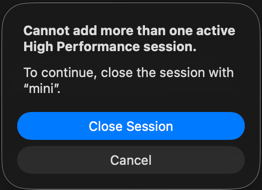
I could not find anyone online documenting a way around the client limit, so here is one such way. The limit is enforced per-process, and not system-wide. So to launch additional high performance sessions, you can simply launch a second instance of the client and then connect to your second remote mac.
open -n -a "Screen Sharing"Research
The feature’s internal name is “ProMode”. Static analysis of the client (/System/Applications/Utilities/Screen Sharing.app, ScreenSharing.framework, ScreenSharingUI.framework, and ScreenSharingKit.framework)
locates the entire gate in the app binary, in a singleton class called SessionControllerManager.
The check is a plain nil-test:
// -[SessionControllerManager hasOpenProModeSession]
return activeProModeSession != nil;![Binary Ninja: -[SessionControllerManager hasOpenProModeSession] returns activeProModeSession != nil](/images/multiple-sessions-macos-high-performance-screen-sharing/bn_hasOpenProModeSession.png)
And activeProModeSession simply walks this process’s own window controllers, held in the instance variable _sessionControllers, and returns the first whose view is running the High Performance media stream (isUsingAVCMediaStream):
// -[SessionControllerManager activeProModeSession]
for (group in self->_sessionControllers)
    for (windowController in group)
        if (windowController.sessionView.isUsingAVCMediaStream)
            return windowController;
return nil;![Binary Ninja Pseudo Objective-C: -[SessionControllerManager activeProModeSession] retaining [self sessionControllers] and fast-enumerating this process's window controllers](/images/multiple-sessions-macos-high-performance-screen-sharing/bn_activeProModeSession.png)
![Binary Ninja Pseudo Objective-C: the inner loop returning the controller when [obj isUsingAVCMediaStream] is true, else nullptr](/images/multiple-sessions-macos-high-performance-screen-sharing/bn_isUsingAVCMediaStream.png)
There is no cross-process state. The gate reads only self->_sessionControllers, an in-memory ivar populated by this instance’s own addSession / addSessionWithURL:….
Since the state is contained to within the process, a second process gets a fresh SessionControllerManager with an empty _sessionControllers, so activeProModeSession is nil, hasOpenProModeSession is false, and the second session connects.
Symbol References
SessionControllerManager,activeProModeSession,hasOpenProModeSession,closeOpenProModeSession,openProModeSessionDisplayName,_sessionControllers,+sharedManagerSSSession,appWantsProModeInterface,setAppWantsProModeInterface:,doesServerSupportProMode,maxVirtualDisplaysSSSessionView,hasOpenProModeSession,isUsingAVCMediaStream,ssSessionWantsProModeInterface:ScreenSharingUI.DisplayConfigurationViewModel,hasOpenProModeSession,maxVirtualDisplays,PromodeDisplayOptionsPickerView- Strings:
"Cannot add more than one active High Performance session.","ProMode enabled","ProModeActive","High Performance","To continue, close the active session."